Every useful agent combines three things: access to private data, exposure to untrusted content, and a way to reach the outside world. Simon Willison calls this “the lethal trifecta”. Put all three together, and one prompt injection hidden in a web page, a support ticket, or a tool result can turn a helpful agent into a nefarious one.
Most AI defenses focus on the model. They tell it to be careful, or scan what it says afterwards. Runlayer does both, with runtime security scanners for prompt injection, intent drift, and data exfiltration. Security leaders still ask a simpler question first: where can this agent actually send data?
Now, Runlayer answers that at the network layer. Each Runlayer agent carries its own network access policy. Every connection the agent opens to the internet is checked against it, whether it comes from a shell command, a package install, a web fetch, or the browser.
In short
- Each agent gets an allow list or a block list of hosts, defined in the agent’s settings.
- Runlayer knows which agent opened each connection, so a rule written for your finance agent never leaks onto your engineering agent.
- Private networks, cloud metadata endpoints, raw IP addresses, and plain HTTP are blocked for every agent.
- If a policy can’t be enforced, the agent doesn’t run.
A firewall that knows which agent is calling
Traditional firewalls see source addresses. Agent sandboxes share a small pool of them, so to a firewall every agent looks the same, and per-agent rules are impossible.
Runlayer ties each network connection to the run, the agent, and the workspace that made it. The agent can’t see or change that identity, and the sandbox has no alternative route to the internet. This is zero trust for agents: every connection is checked against the agent that opened it.
Traffic to Runlayer itself, to the LLM gateway, and to the agent’s connectors stays on private paths. Network policies never block an agent’s Runlayer MCP connectors. They only apply to connections the agent opens from inside its sandbox to other hosts, for example with curl, npm install or wget.
Protections that are always on
Some destinations are never safe for an agent, whatever its policy says. Runlayer blocks private networks, loopback addresses, and cloud metadata endpoints for every agent. It checks the address it is about to connect to, so a hostname that quietly resolves to an internal address is caught too. Raw IP addresses and plain HTTP are refused, and Runlayer confirms the agent is talking to the host it asked for.
When a connection is blocked, the agent returns to the user session with a clear message. Every connection is also written to the audit log with the run, the agent, the host, and the outcome. Sensitive data like request bodies and credentials are never logged.
Writing a policy
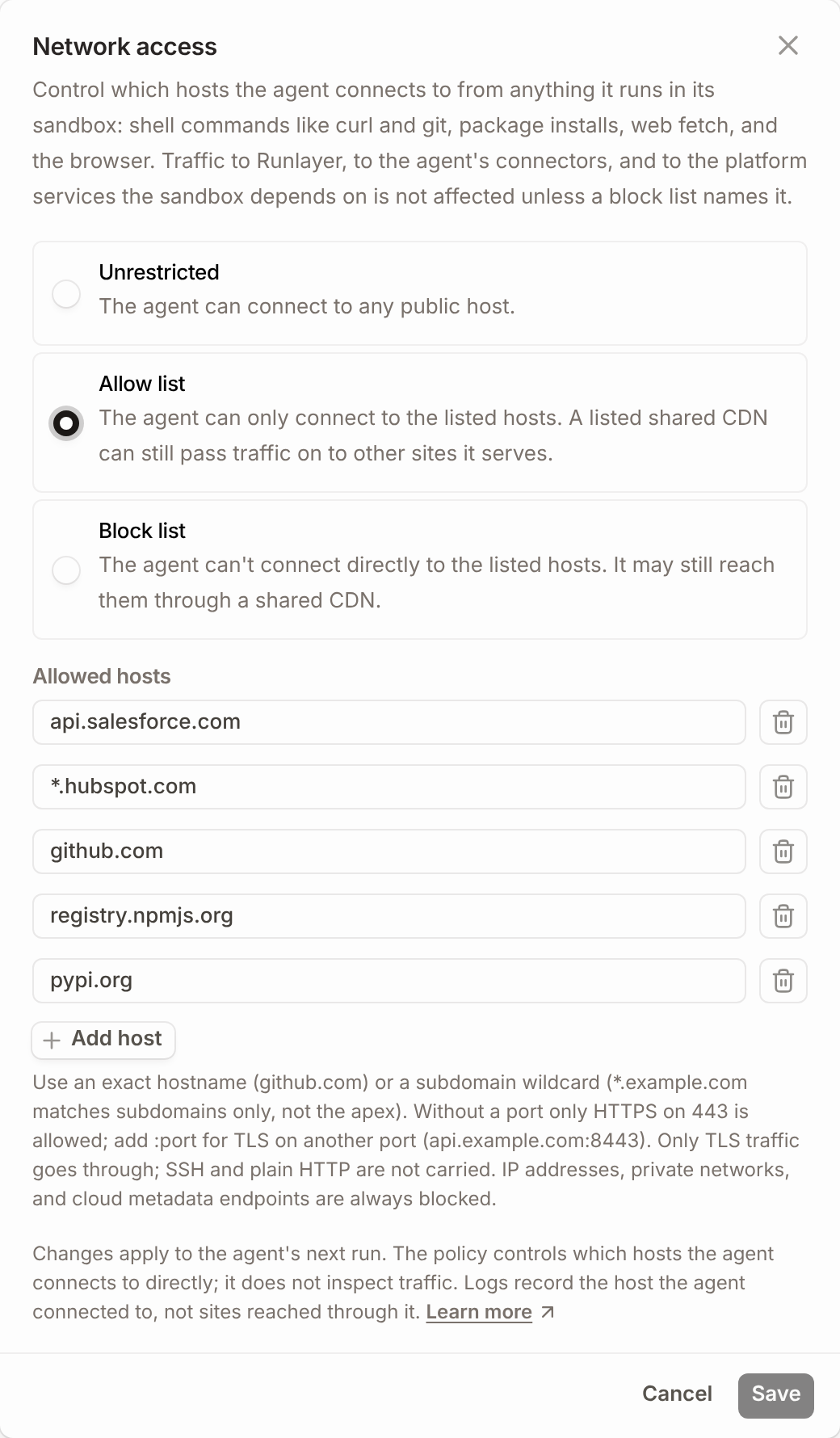
Admins pick one of three modes for each agent:
- Unrestricted. The agent can reach any public host over HTTPS. Private networks, cloud metadata endpoints, and raw IP addresses stay blocked.
- Allow list. The agent can reach only the hosts you list, such as
api.salesforce.comor*.hubspot.com. Everything else is denied. - Block list. The agent can reach anything on the internet, except for the hosts you name.
Policies can also be set through the API, so they can live alongside the rest of your agent configuration.
Built to fail closed
A security control that quietly switches itself off is worse than none, because everyone assumes it’s working. When Runlayer can’t enforce an agent’s network policy, the agent doesn’t run.
One layer of a secure-by-design agent
Network access policies control which hosts an agent can reach. It doesn’t read the data the agent sends to a host you’ve allowed, so the tightest policy lists exactly what the job needs. It works alongside agent identity, policies on every tool call, and runtime security scanners, so Security can approve more agents with confidence.
Runlayer is the leading AI control plane, with AI enablement, security, and control in one platform. Network access policies are available today for Runlayer-hosted agents and self-hosted AWS deployments. See how they fit your security review → book a custom demo.