At many enterprises, Microsoft Teams is where questions get asked and approvals get chased. AI transformation leaders who want every employee to delegate real work to agents have to meet people there, or adoption stalls in the teams that never open another tab.
When we brought Runlayer Agents to Slack, Microsoft 365 companies asked one question: when is Teams coming? Today Runlayer Agents are available in Microsoft Teams in beta, on the same golden path and with the same security model.
In short
- Any Runlayer agent can get its own Teams bot with one toggle. Runlayer builds and publishes the app for you.
- Agents answer @mentions, DMs, and group chats, can follow a channel, and show their progress live while they work.
- Approvals, link previews, and security alerts work natively in Teams.
- Each bot inherits its agent’s identity, policies, and audit trail. Governance stays exactly where it was.
Every agent gets its own Teams bot
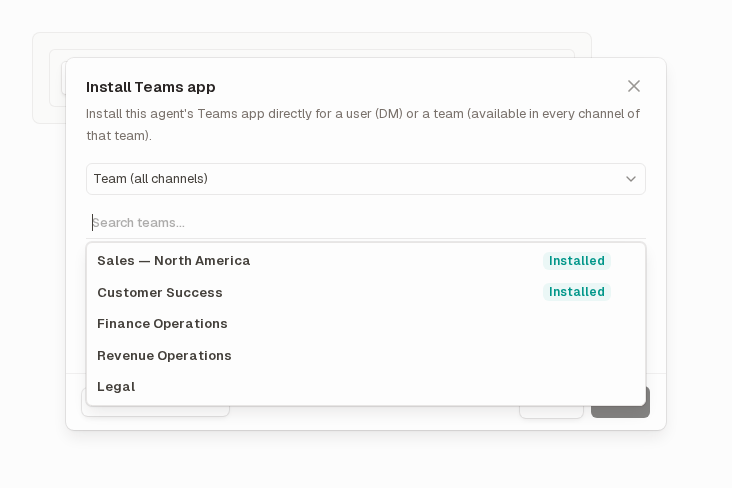
A Microsoft 365 admin connects your tenant to Runlayer once. After that, turning on Teams for an agent is a single toggle in its settings. Runlayer creates the agent’s Teams app and publishes it to your organization’s private app catalog, where only your people can see it. Then you decide who gets it: one person, one team, every user, or every team.
Your team doesn’t need its own Azure subscription, and there are no bot credentials to keep renewed. The only prerequisite is allowing custom apps in the Teams Admin Center.
Why one bot per agent?
With one bot per agent, each agent has its own name, icon, install audience, and permissions in Teams. People can tell at a glance whether they’re talking to the Finance agent or the IT helpdesk agent, and admins can roll each one out on its own schedule.
From a Teams message to an answer
Every message is checked before an agent acts on it: Runlayer confirms it came from Microsoft, works out who sent it, and checks that they’re allowed to run that agent.
Agents often take a while. They search, call tools, write files, and wait for approvals. So the bot posts a “Working on it” card straight away and keeps updating that same card as the run moves forward, with each tool call as a checklist line. When the run finishes, the final answer replaces the progress view, with tables, code, and images rendered natively.
Agents that work like teammates
Once installed, employees work with an agent the way they work with a colleague. Runlayer Agents in Teams can:
- Reply when @mentioned in a channel, in group chats, or in a direct message, using earlier turns as context
- Follow a team’s channels without being tagged, and reply only when a message matches a condition you describe in plain language, like “someone reports a production outage”
- Post into a channel from a scheduled or webhook-triggered run, so a nightly report lands where the team already looks
- Ask for approval before a sensitive action, with Approve and Deny buttons in the chat
- Turn pasted Runlayer links into preview cards that show details only to people with access
The built-in Runlayer Assistant is installed into every team automatically, so employees can start asking questions on day one.
Approvals where the work happens
When an agent’s policy says an action needs a human, the person who asked gets a direct message with the request and two buttons. One click decides it. The card then updates to show the outcome, so nobody acts twice on the same request, and an expired or unauthorized click gets a clear answer.
The same governance, in a new place
Each Teams bot is tied to its Runlayer agent, so it inherits the agent’s identity, access controls, tool policies, and audit trail.
The first time someone messages an agent, the bot sends them a one-time link to connect their Teams identity to their Runlayer account. If they wrote in a channel, the link arrives privately. From then on, every action is attributed to a real user and a real agent, and access is checked on every message.
Security teams can also route security scan alerts to a Teams channel of their choice, with the option to alert only when a tool call was actually blocked. Connecting a tenant, creating a bot, and removing one are all recorded in the audit log.
| Capability | Slack | Microsoft Teams |
|---|---|---|
| Mentions, DMs, group chats | Yes | Yes |
| Follow a channel with a condition | Yes | Yes |
| Live progress while the agent works | Yes | Yes |
| Inline approvals | Yes | Yes |
| Link previews | Yes | Yes |
| Security alerts to a channel | Yes | Yes |
| File attachments in and out | Yes | Coming soon |
Meet your workforce where it works
Agents change how a company works only when people use them. With Runlayer in Slack and Microsoft Teams, employees get agents in the tools they already live in, and Security governs every one of them from the same place. Runlayer is the leading AI control plane, with AI enablement, security, and control in one platform. Microsoft Teams support is available now in beta. See it in action → book a custom demo.