AI budgets have grown faster than almost any other line item. There are seats for coding assistants, API keys for every team, and agents running on schedules overnight. Finance leaders can see the invoices. They can’t see the return.
The usual answer is a survey: ask employees how much time AI saves them, multiply by salary, and hope the number survives a board meeting. Self-reported time savings don’t measure output, and they can’t tell AI transformation leaders which teams, tools, or agents deserve more investment.
Runlayer already sits between your AI tools and the systems they act on, so it can see the work itself. Here’s what that lets Finance and AI leaders do.
In short
- Runlayer counts what AI actually created: pull requests, issues, documents, CRM records, messages, and artifacts.
- The same data gives the same answer every time you ask.
- Output and cost roll up to the teams and departments you already manage in your identity provider.
- Budgets for teams, users, and agents stop runaway spend before it becomes an invoice.
Count the work, not the hours
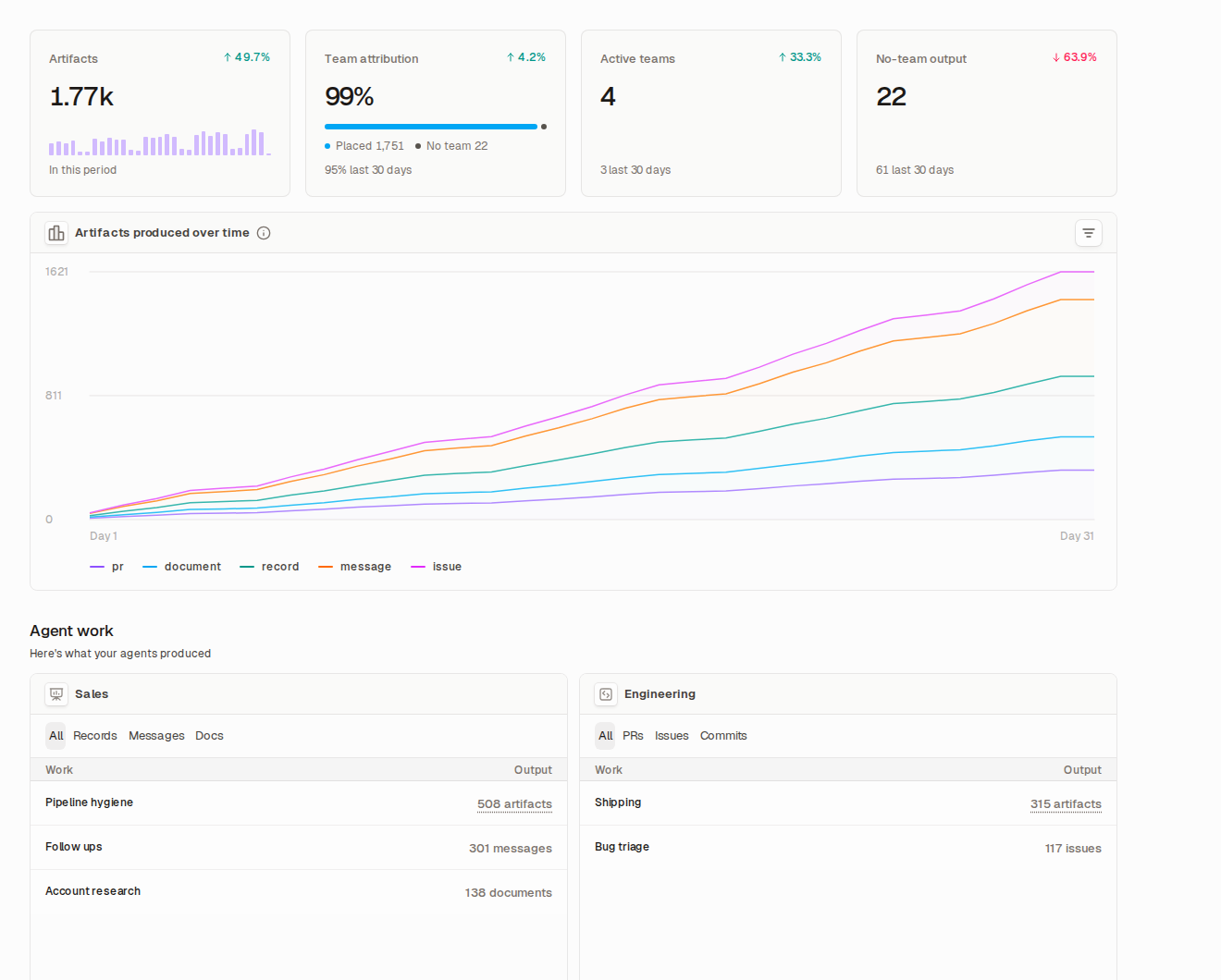
Runlayer’s new Output view shows what your agents and AI tools produced: pull requests and commits, issues, documents, CRM records, messages, and published artifacts. Something counts only when an AI tool call actually created it. Nothing is estimated, and nothing is self-reported.
That holds for every function. Runlayer recognizes the sales and operations work behind connector tool calls, from emails sent through Gmail and Outlook to records created in Salesforce and HubSpot and pages written in Notion, Confluence, and Google Workspace. A sales team’s pipeline hygiene agent shows up next to an engineering team’s pull requests in the same view.
Related outputs are grouped into one unit of work, so a branch, a dozen commits, and the pull request they belong to count once. In one real day of usage, a single engineer’s 81 rows of raw activity came down to 15 units of work.
A cost for every piece of work
Long agent sessions are where cost tracking usually breaks. One of our own sessions ran for 27 hours and opened five pull requests. Charging each PR the cost of the whole session would have shown the same $128 five times, and the company total would have been five times too high.
Runlayer gives each pull request its own share of the session, and the shares always add up to what you actually spent. Where a share is an estimate, the view says so.
Connect spend to outcomes, team by team
Work is credited to the people behind it, then rolled up to teams or departments. Each person counts toward exactly one team, so the team totals always add up to the company total. AI transformation leaders can finally answer the questions the board asks:
- Which teams are getting real value from AI, and which need enablement?
- Which agents produce the most work per dollar, and which should be retired?
- How much output comes from autonomous agent runs, and how much from people working with AI?
- Where is AI output happening with no team attached?
Every agent run also shows its tokens and cost, recorded once, so the spend numbers behind your ROI hold up in a budget review.
Budgets that actually stop spend
When it’s time to act, the controls live in the same place. Admins can set daily, weekly, monthly, or lifetime budgets for the whole organization, or for teams, groups, users, and agents. When a budget runs out, Runlayer can switch requests to a cheaper model or stop them, and work resumes when an admin raises the budget or the period resets.
| Question | Survey-based ROI | Runlayer |
|---|---|---|
| What did AI produce? | Self-reported | Counted from tool calls |
| Is it repeatable? | Changes every quarter | Same data, same answer |
| What did it cost? | Total invoice only | Cost per unit of work |
| Who gets credit? | Whoever answered | One team per person, adds up |
| Can you act on it? | Next budget cycle | Budgets enforced today |
From AI spend to AI strategy
The companies that win with AI will be the ones that know what their spend produces and double down on what works. Runlayer is the leading AI control plane, with AI enablement, security, and control in one platform, and it gives Finance, Security, and AI transformation leaders one view of usage, spend, and output. See it with your own data → book a custom demo.